Introducing the Bizthom Inbox: where your DMs become sales
Nigerian customers buy in conversations. The Bizthom Inbox puts WhatsApp, Instagram, Facebook, website chat and email in one place, shows who’s ready to pay, lets Bizthom’s Ejiro close the sale, and turns any chat into an order in one click.
 Bizthom Team
Nigerian customers don’t hate buying online. They buy in conversations. They see your post or your ad, they send “how much?”, they ask for more pictures, they negotiate, they ask what delivery costs, and only then do they pay.
Across Bizthom stores, sales that came through DMs brought in about twice what website orders did over the 90 days to 11 October 2026. Yet almost every tool sellers have been given was built for websites. Websites remind the buyer who left a bag. Nobody reminds the buyer who left your chat.
The Bizthom Inbox is built for that conversation. It puts every chat in one place, tells you who is ready to pay, lets Bizthom’s Ejiro close the sale for you, turns any chat into an order in one click, and makes sure nobody who asked “how much?” slips away. And because it’s part of Bizthom, every sale it makes comes off the same stock as your website and your shop.
Here is everything it does.
1. Every conversation, in one place
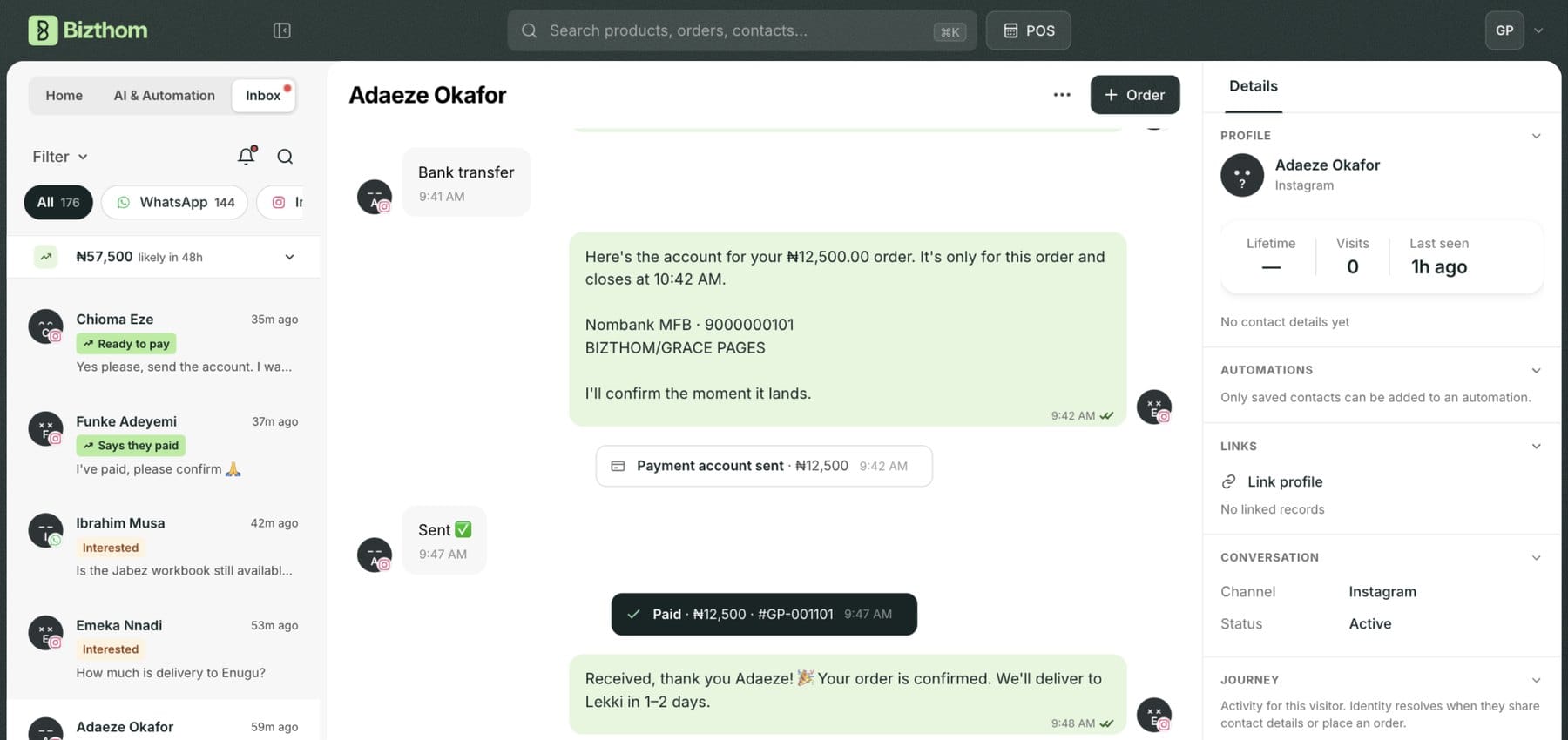
- WhatsApp, Instagram, Facebook Messenger, your website chat, email and Telegram, side by side in one inbox. The buyer who chatted on your website at midnight sits next to the one who DMed you on Instagram.
- Keep your WhatsApp number. Connect by scanning a QR code with the WhatsApp you already use, and your past chats come in with it.
- Connect Instagram straight from the Inbox: tap Connect Instagram, approve it, and you land on your Instagram chats.
- Reply with everything customers send you: photos, videos, voice notes and audio, plus documents on Messenger. Files customers send on WhatsApp come through up to 50MB, so price lists and long videos open without picking up your phone.
- Your phone and your Inbox stay in step. Reply on WhatsApp or the Instagram app on your phone and the chat is marked read in your Inbox too. Instagram messages show read ticks when the customer sees them.
- Answer from any page. On desktop and iPad, your Inbox sits in a small chat dock at the bottom of every dashboard page, so you can reply without leaving what you’re doing.
2. Know where every chat came from
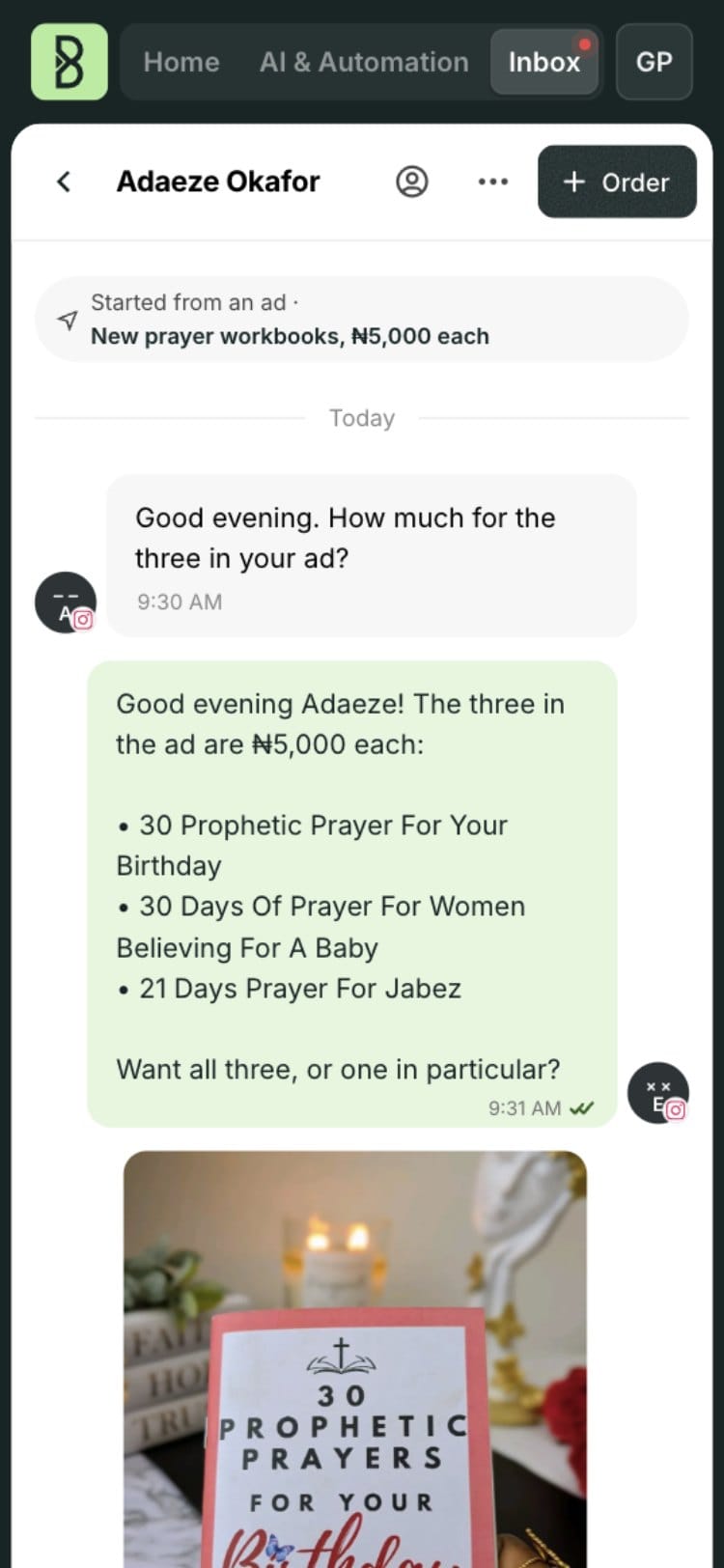
- “Started from an ad” sits on the chat, with the ad and campaign it came from.
- Ejiro knows the products in your ads and posts. When someone taps your ad and asks “how much for the three?”, Ejiro answers with the live price of each product in it. It also sees the story a customer replied to and the post they shared with you.
- The sale is credited to the ad that brought it. When an order is made from that chat, it counts towards that ad and campaign, so your ad reports include the sales that closed in your DMs, not only the ones on your website.
3. The whole customer, beside the chat
Next to every chat, the Details panel shows who you’re talking to across your whole business, not just this conversation.
- Their profile: name, phone, email, Instagram handle, location, how much they’ve spent with you in total, how many times they’ve visited your website, when they were last seen, and how long they’ve been your customer.
- Their journey: a timeline of everything they’ve done. The pages and products they looked at on your website, the blog posts they read, what they added to their bag, checkouts they started, prices they offered and whether you accepted, and every order placed, paid, out for delivery and delivered. Campaign links they clicked, forms they filled and the automations they’re in show up too.
- Their orders, and what they still owe: every order linked to this person, including any balance left on a part payment.
- One person, not five strangers. Bizthom links the same customer across WhatsApp, Instagram, Facebook, your website and your shop, so the person who asked on Instagram and paid on WhatsApp is one customer. When it isn’t sure two profiles are the same person, it asks you.
- What your team knows: labels, interests, a flag or a star, who owns the chat, and private notes.
You reply knowing who they are, what they’ve bought, what they’ve been looking at and what they still owe you.
4. Know who is ready to pay
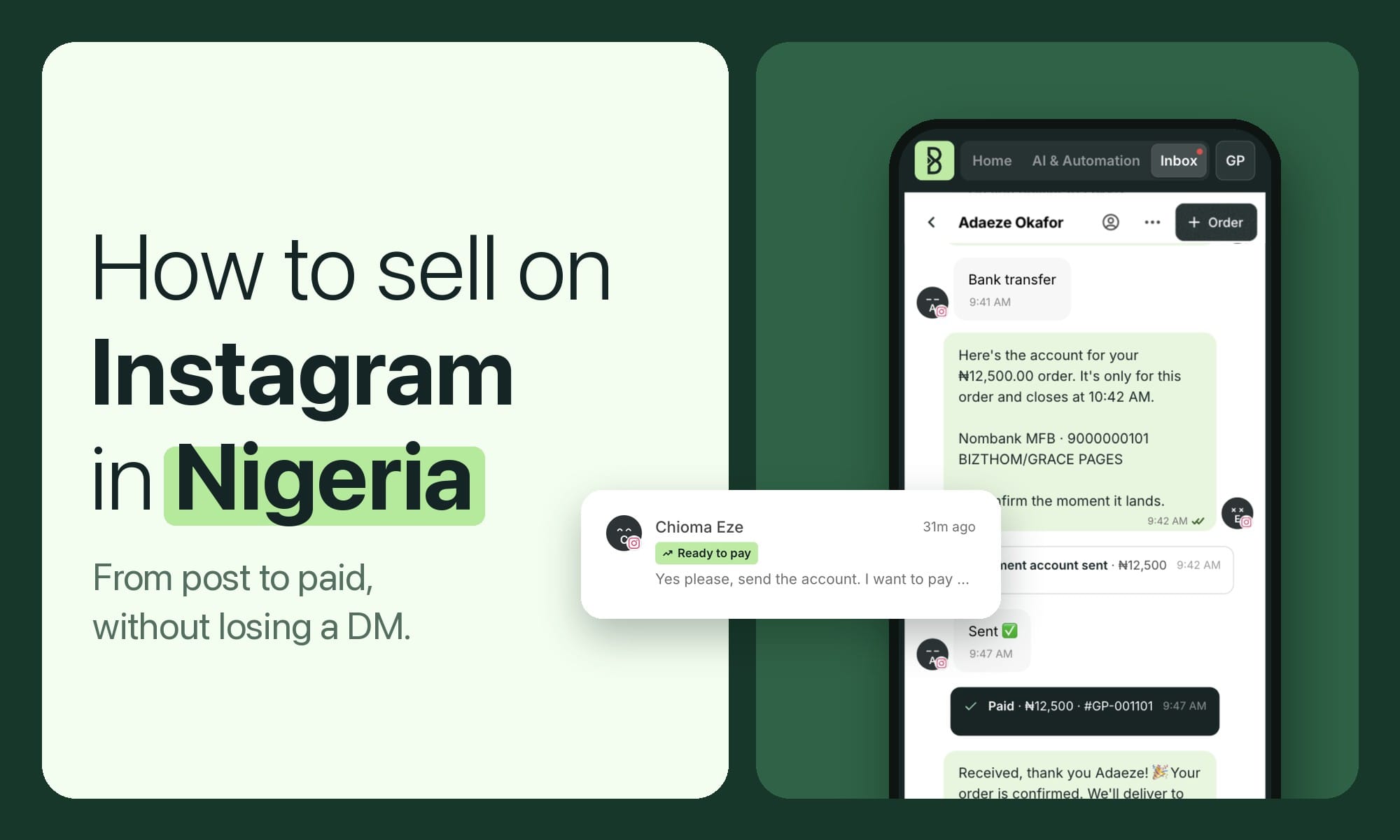
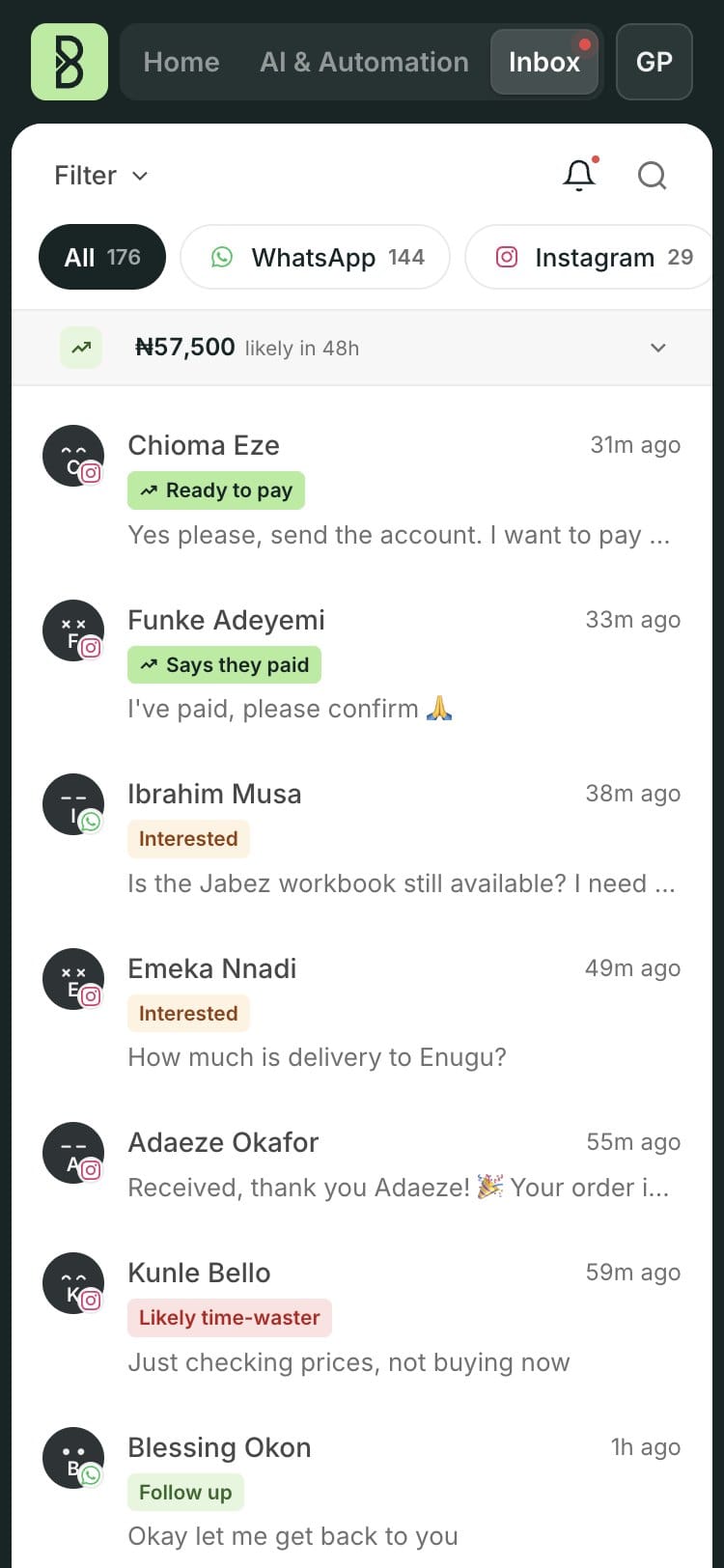
Every chat is marked for you: Ready to pay, Says they paid, Interested or Likely time-waster, with the reason in plain words, such as “Asked for account details”, “Bought from you before” or “Asked to pay before and never did”.
- See how much is likely to come in over the next 48 hours, across all your chats.
- Open a chat to see its chance of paying, what it’s worth, and how soon to reply before it goes cold.
- See what kind of buyer it is, whether they usually come back on their own, and the best time to follow up.
You answer the people about to pay first, and stop spending your evening on the ones who never will.
5. Bizthom’s Ejiro closes the sale in the chat
Plenty of bots can answer a chat. Ejiro, Bizthom’s AI sales agent, closes the sale, from “hello” to “paid”, on WhatsApp, Instagram, Facebook and your website.
- Answers from your real stock and prices, in the way you talk to customers, learned from your past chats, with you approving what it learns.
- Understands voice notes, photos and screenshots, including product labels and measurement photos, and checks your catalogue before giving a price. A misspelled product name gets “did you mean…?”, not a dead end.
- Negotiates like a Nigerian vendor, within limits you set, and never below your lowest price.
- Handles the worry before the sale: offers pay on delivery, part payment or your returns policy when you allow them.
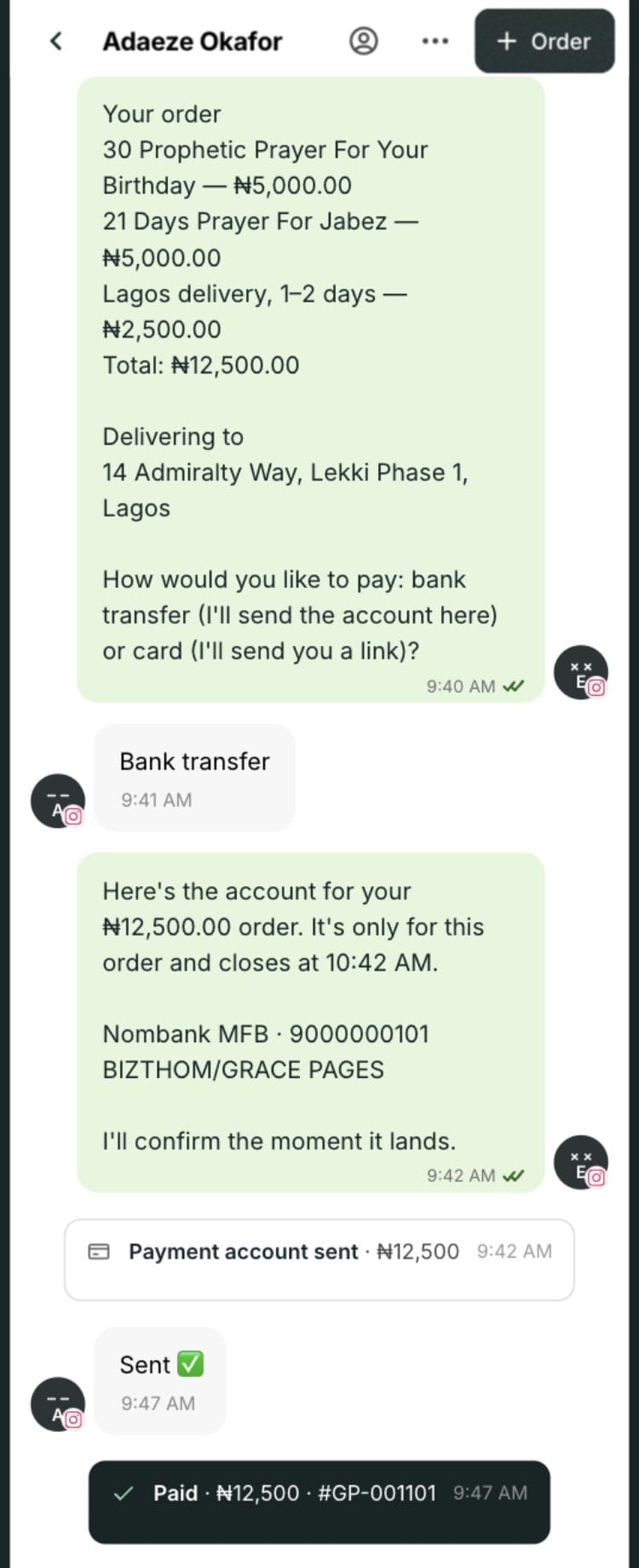
- Takes the delivery details, gives the fee for the buyer’s area, and sends an account number made for that order as soon as the total is known. When the money lands, the payment confirms itself. No screenshot, no checking your bank app.
- Records the order and takes the item off the same stock as your website and shop.
- Hands the chat to you when a customer asks for a person, reports a problem or wants something custom. Tap “Let Ejiro continue” and it picks the sale back up.
- Never loses a reply. If your linked WhatsApp drops for a moment, Ejiro’s replies and payment accounts wait and go out once it’s back.
Filter your Inbox by Ejiro to see every chat it answered, and step into any of them. We compared Ejiro with Meta’s own agent in Meta AI for WhatsApp Business vs Bizthom’s Ejiro.
6. One click from chat to order
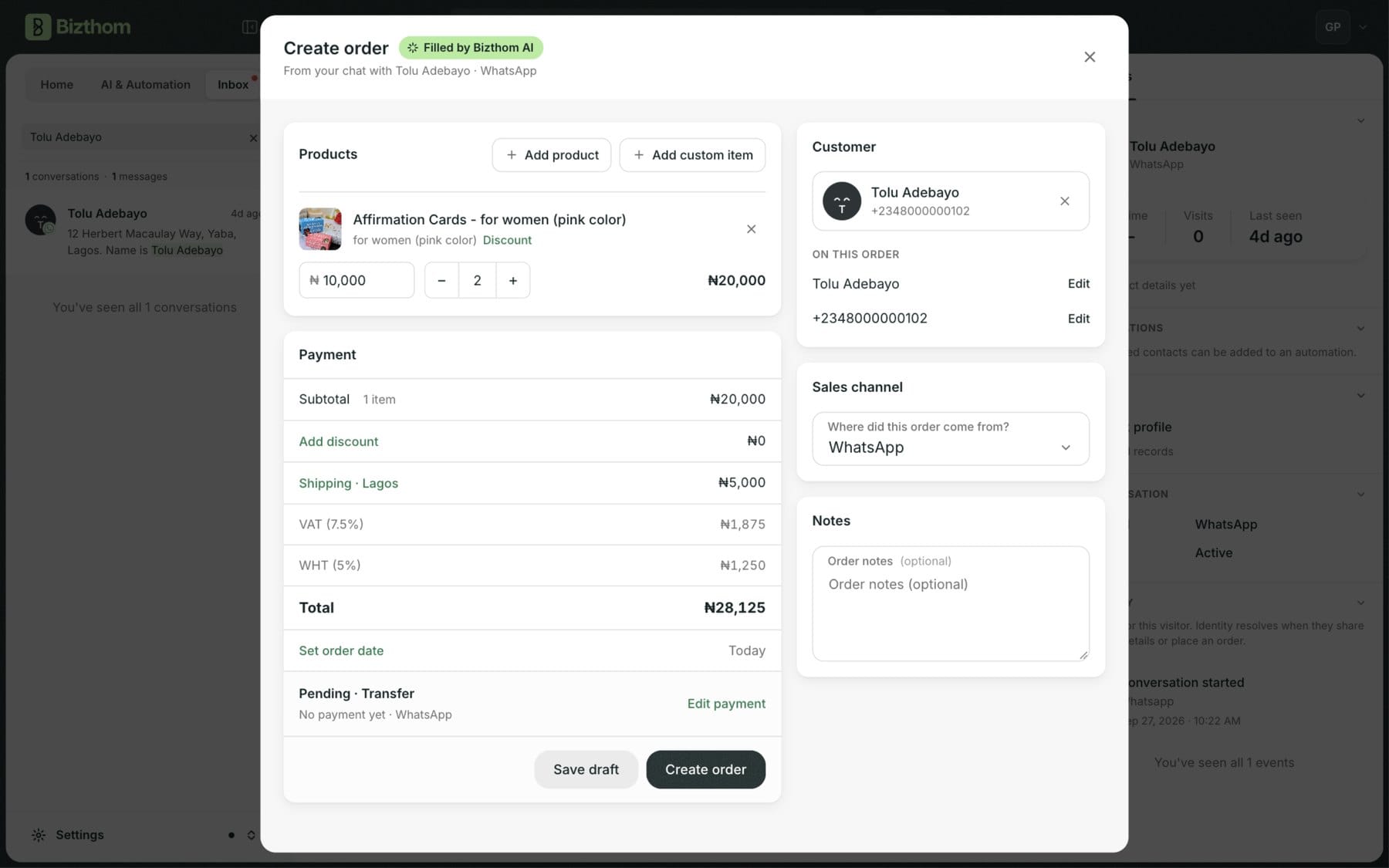
For the chats you handle yourself, tap Order in the chat. Bizthom AI reads the conversation and fills in the products, quantities, address and delivery, and reads the transfer receipt the buyer sent as the payment. The buyer is already saved as a customer. Check it and confirm.
- No more scrolling up the chat and typing the sale into a notebook or your POS.
- Every DM sale is counted in your sales, your stock and your reports.
- Send an invoice or a payment link from the chat, and follow every checkout made in a chat from your Orders page.
7. Nobody who asked “how much?” slips away
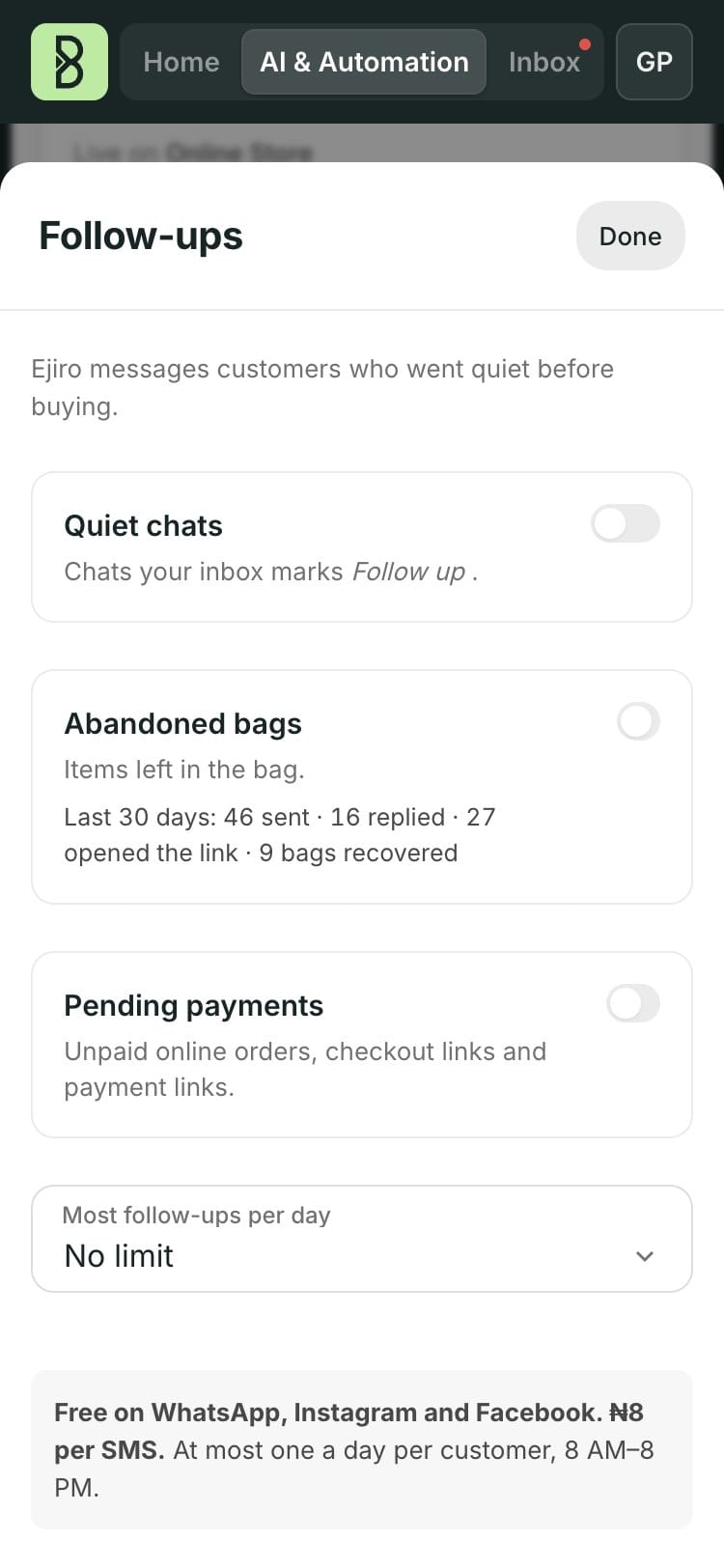
- Chats that went quiet are flagged with the reason, so “I’ll get back to you” doesn’t become “never”.
- A morning email at 7am lists the chats that went quiet since yesterday, waiting before your day starts.
- Ejiro follows up for you in the same chat, about the product they asked for. Switch it on for quiet chats, unpaid orders and bags left on your website.
- Customers who come back after a day are greeted as a new conversation, and Ejiro may ask about what they looked at last time.
8. Work your Inbox as a team
- Every chat has an owner. Assign it to a teammate, or reply to a chat nobody owns and it becomes yours, so no customer gets two answers or none.
- Internal notes with @mentions pull a teammate in, and they get a notification.
- Your own labels, plus views for Mine, Unassigned, Mentions and Handed over.
- See who sold what. Orders show each team member’s sales, and Ejiro’s, so you can reward the people who close DM sales.
9. Every chat builds your customer list
- WhatsApp buyers are saved with their name and number from their first message. Instagram and Facebook buyers are saved as you chat, with their number added when they share it. Lose access to an account and you still have your customers.
- Praise becomes proof. Compliments already sitting in your chats, voice notes and photos included, become reviews on your website once you approve them.
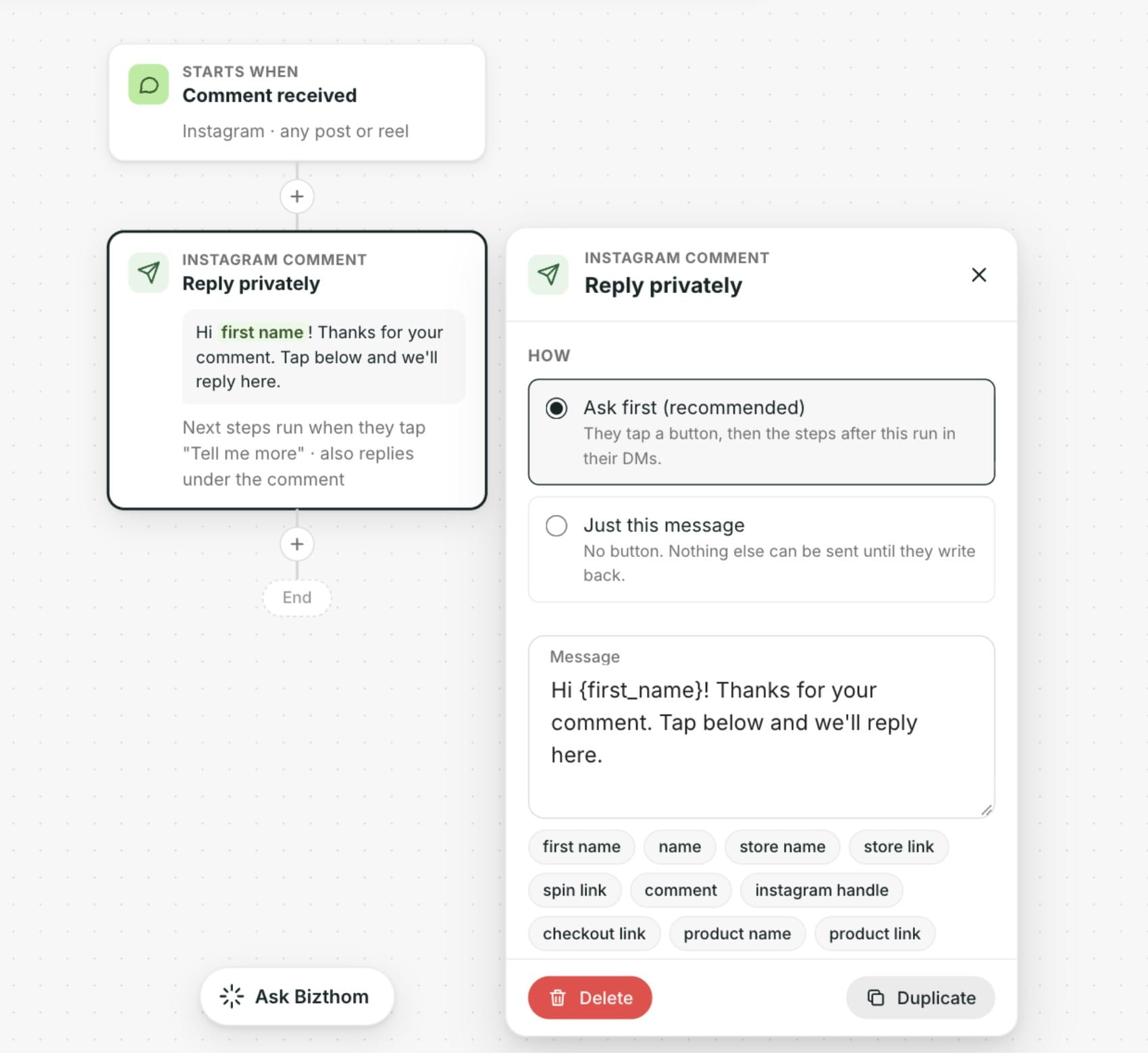
- Automations that reply for you: when someone comes from an ad, writes a word like “price” or messages you for the first time, an automation can send a checkout link made just for them, or hand the chat to Ejiro or your team. Comments on your Instagram posts and reels can move into DMs the same way.
- Add a customer to an automation from their chat, and see which automation already messaged them before you reply.
10. You stay in control
- Choose which channels Ejiro answers on, and step into any chat at any time. Reply yourself and Ejiro steps back until you hand the chat back.
- In Settings › Bizthom AI, turn off any Inbox feature that reads your customer chats: buy signals, chats to follow up, reviews from your DMs, or filling orders from a chat.
Get started
- Connect your WhatsApp by scanning the QR code, then connect Instagram and Facebook from the Inbox.
- Turn on Ejiro and choose the channels it answers on.
- Switch on follow-ups, and let the morning email tell you who went quiet.
Some Inbox features come with some plans and not others. See Bizthom pricing for what each plan includes.
Questions sellers ask
Can I keep using WhatsApp on my phone?
Yes. You connect the WhatsApp you already use, keep chatting on your phone if you like, and the Inbox stays in step.
Will Ejiro reply to every customer?
Only on the channels you turn on, and it steps back the moment you reply yourself. It hands chats to you when a person is needed.
Can my team share the Inbox?
Yes. Assign chats, mention each other in notes, and see who sold what.
Do sales from the Inbox update my website stock?
Yes. A sale made in a chat comes off the same stock as your website and your shop the moment it’s paid.
The Bizthom letter
One email a week: what's working for Nigerian merchants selling in DMs, online and at the counter.